How to Make an Instruction Manual That People Actually Use in 2026
Gregor Obreza, Co-founder and CEO
Practical guide to creating instruction manuals that reduce errors, speed up training, and stay up to date. No fluff. Built for real teams and real work.
30-second summary:
Most instruction manuals fail because they are written too late, too abstract, and never updated. Effective manuals are built around real tasks, real sequences, and real context. This guide shows how to create instruction manuals that people actually follow — and how modern teams skip writing altogether by turning videos into step-by-step instructions with AI.
Why most instruction manuals fail
Instruction manuals don’t fail because teams don’t care. They fail because documentation is treated as a writing task, not an execution tool.
Common failure patterns:
- Manuals describe what should happen, not what actually happens
- Steps are too generic to guide real decisions
- Visual context is missing
- Updates lag behind process changes
- Operators ask coworkers instead of checking the manual (wasting production time of two workers!)
If people avoid the manual, it is not a discipline problem. It is a design problem.
What a good instruction manual actually does
A usable instruction manual does three things consistently:
- Shows the correct sequence of actions
- Removes ambiguity at decision points
- Makes the right behavior obvious, not memorable
Good manuals reduce variation. Great manuals reduce thinking time.
Step 1: Define the task, not the topic
Instruction manuals should be built around tasks, not concepts.
Wrong approach:
- “Machine setup overview”
- “Quality control basics”
Correct approach:
- “Set up machine X for product Y”
- “Perform first-article quality check after changeover”
Each manual should answer one operational goal clearly.
Step 2: Capture the real process
Do not start by writing.
Start by observing how the task is actually performed:
- What order actions happen in
- Where operators pause or double-check
- Which steps are safety-critical
- What mistakes happen most often
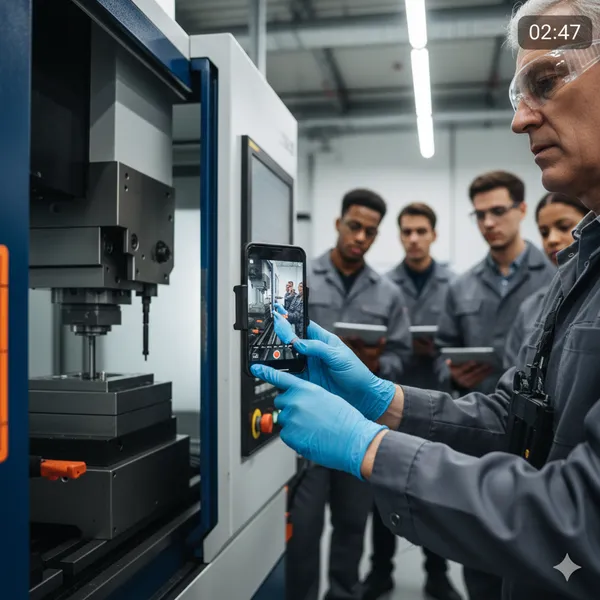
This is why video is so powerful. It captures timing, movement, and context that text misses.
Step 3: Break the process into executable steps
Each step should:
- Start with a clear action
- Describe one decision or movement
- Lead to an observable result
Example:
Tighten the clamp until the indicator aligns with the green mark. The part should no longer rotate when touched.
If a step cannot be verified, it is incomplete.
IMPORTANT: Always use the language that the intended audience will understand. You may be an engineer or a manager, but if your worker doesn’t understand the words and actions, they will not learn, will produce waste, or will abandon the manual altogether.
Step 4: Use visuals where judgment matters
Text explains intent. Visuals explain reality.
Use visuals to show:
- Exact hand placement
- Orientation and alignment
- Tool positioning
- Safety boundaries
This is especially critical for training, troubleshooting, and multilingual teams.
Step 5: Make updates easy or it will decay
Static PDFs decay fast.
The moment updating a manual feels heavy, people stop doing it. That is when manuals turn into liabilities instead of assets.
Modern instruction manuals must:
- Be editable step by step
- Support versioning
- Reflect process changes quickly
- Stay accessible on the shop floor
- Have clear mechanism for feedback in place
The faster alternative: turn videos into instructions
Many teams already record:
- Training walkthroughs
- Machine setups
- Maintenance tasks
- Troubleshooting sessions
The bottleneck is not recording. The bottleneck is structuring.
AI can now:
- Split videos into ordered steps
- Extract actions and safety notes
- Generate clear, consistent instructions
- Keep documentation aligned with real work
This shifts teams from writing manuals to reviewing them.
AI isn’t magic, but it’s practical. It gets you 80% of the way there—fast. Instead of starting from scratch, you simply review and adjust a few details. This saves you and your team hours every month.
Why this approach scales
Teams using video-based, AI-generated instructions:
- Train faster
- Reduce errors across shifts
- Preserve knowledge when people leave
- Standardize without slowing production
This is why video-first work instructions are becoming the default in modern operations.
Frequently Asked Questions
How long should an instruction manual be?
As long as required to complete the task correctly. No more. If people scroll endlessly, it is too long or poorly structured. In that case, split it into separate manuals.
Should instruction manuals be written for experts or beginners?
They should be written so a trained but unfamiliar person can succeed without assistance. Experts benefit from clarity as much as beginners. But always have a person reading it in mind when creating the manual.
Are videos better than written manuals?
Raw videos are not enough. Structured steps with visual context outperform both text-only manuals and unstructured videos.
How often should manuals be updated?
Whenever the process changes. If updates are delayed, the manual becomes untrusted and stops being used.
Can instruction manuals support multilingual teams?
Yes. Visual-first, step-based instructions translate more reliably than text-heavy documents and reduce interpretation errors.
Do digital work instructions replace SOPs?
They modernize them. Many teams treat them as living SOPs that stay aligned with real execution instead of static documents.
Create work instructions without writing
If your team already has process videos but still struggles with outdated or missing instruction manuals, you can skip the documentation bottleneck.
TagPlan AI turns real videos into clear, step-by-step work instructions in minutes — ready for training, execution, and continuous improvement.
Apply for early access: https://tagplan.app/ai-training/early-access